After some big refactoring made in Gine, I started to play with shaders.
It's not my first time of course, but I'm trying to standarize fx file loading and usage. Another time - make it user friendly.
My first goal was to make a very simple greyscale post-processing effect. Now it looks like that:
Supersimple pixel shader goes like:
Notice the usage of a gTransition float. Yeah! I made smoot transitions as well and I must say it looks exactly as it should ;)
The next step was to blur the background at a pause stage:
The thing was tricky - Gaussian blur needs two passes to work in an optimal way. So after adding a backbuffer render target view, I had to add another and swap them in meantime. Geez, it's so unnecessarily complicated at that level.
I'm happy that main rendering loop looks like that:
And when you want to enable or disable the effect:
Showing posts with label post-processing. Show all posts
Sunday, September 22, 2013
Monday, March 18, 2013
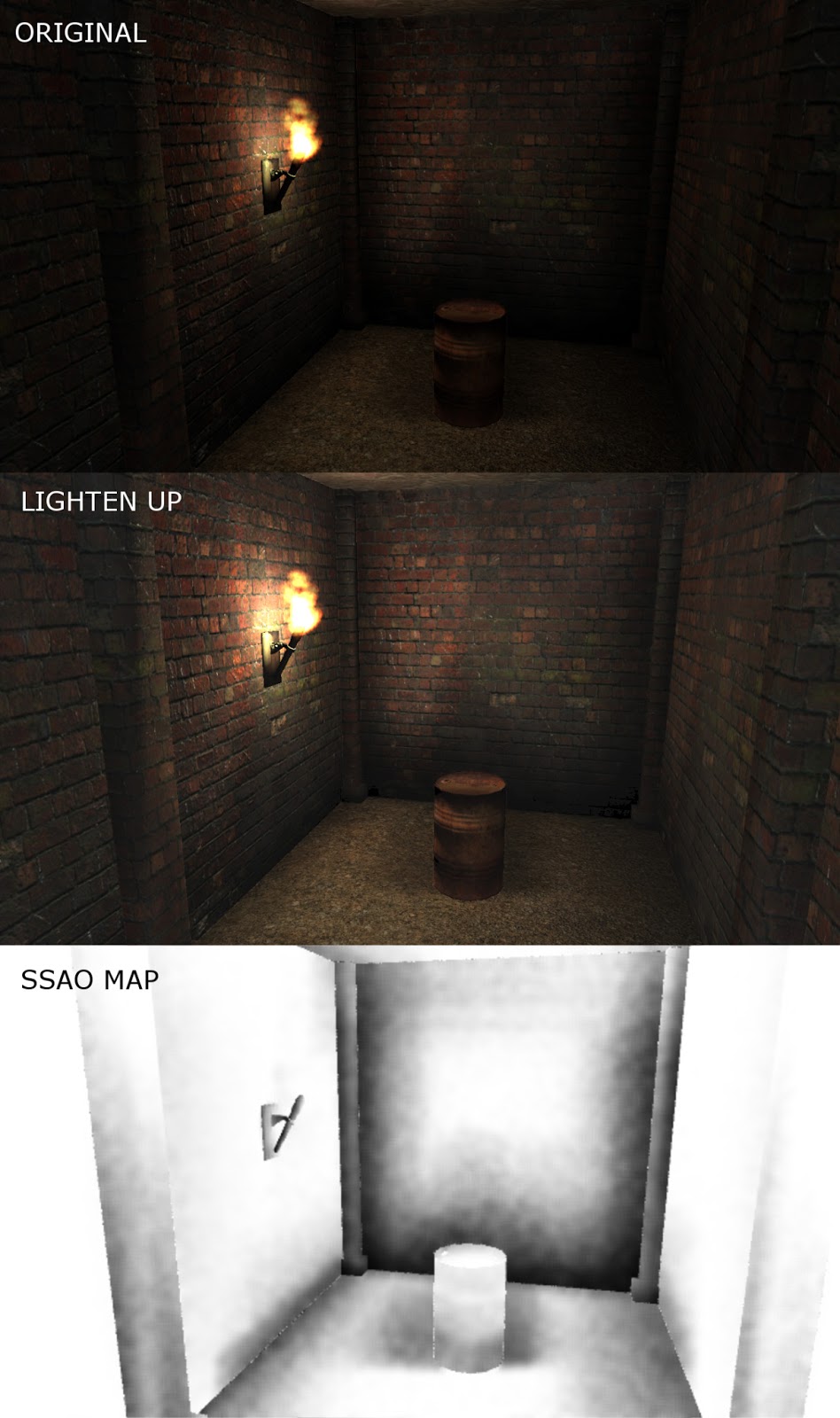
Dark, Darker, The Darkness
So I implemented my first dynamic SSAO. Results are following:
I still need to tweak light intensivity etc. but this SSAO method looks weird to me. Model's edges around the camera frustum aren't shaded, but the rest seems to be alright. Also it's quite expensive for rendering time, I know it's post-process but a geometry is rendered twice. Of course it's possible to do it in one pass, but I need to learn about MRT technique first ;)
Friday, January 25, 2013
Edges #1
OK, so here's my first try to do toon edges. It looks very badly, but it's the simples method I've found. Check out this:
http://rbwhitaker.wikidot.com/toon-shader
Oh It looks so nice on that turtle... Unfortunately only there. The mesh must be smooth to accomplish a good effect, other way the neighbouring normals will be orthogonal to each other and edges get gaps between them. Also, the line won't "stick" to an object, it can "float" a few units next to it. See it here:
Screen looks very untidy. This isn't a look I want to have ;)
So today I'll have more time to try the-way-better method; render normals and depth to texture, do a edge detection and mix it with a regular render. Simple post-processing but in fact, (another time) my first one ;)
http://rbwhitaker.wikidot.com/toon-shader
Oh It looks so nice on that turtle... Unfortunately only there. The mesh must be smooth to accomplish a good effect, other way the neighbouring normals will be orthogonal to each other and edges get gaps between them. Also, the line won't "stick" to an object, it can "float" a few units next to it. See it here:
Screen looks very untidy. This isn't a look I want to have ;)
So today I'll have more time to try the-way-better method; render normals and depth to texture, do a edge detection and mix it with a regular render. Simple post-processing but in fact, (another time) my first one ;)
Subscribe to:
Posts (Atom)